AI Bootcamp: Tools for Economic Research
Claude Code, Codex & the Research Pipeline
Kiel Institute for the World Economy
Kiel Institute for the World Economy
2026-04-16
Watch this.
Why This Matters
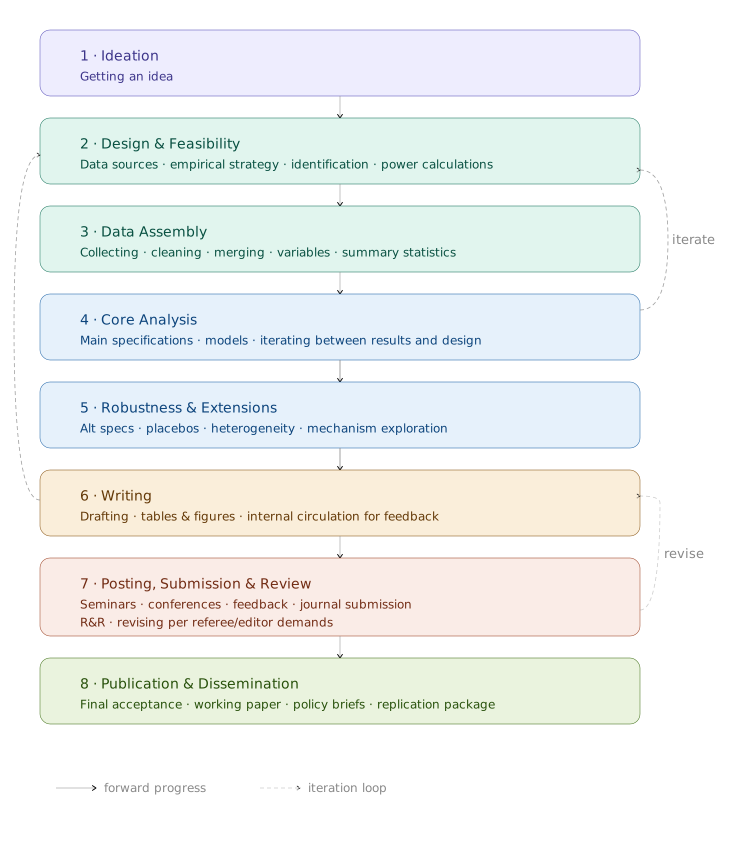
Research Is a Pipeline
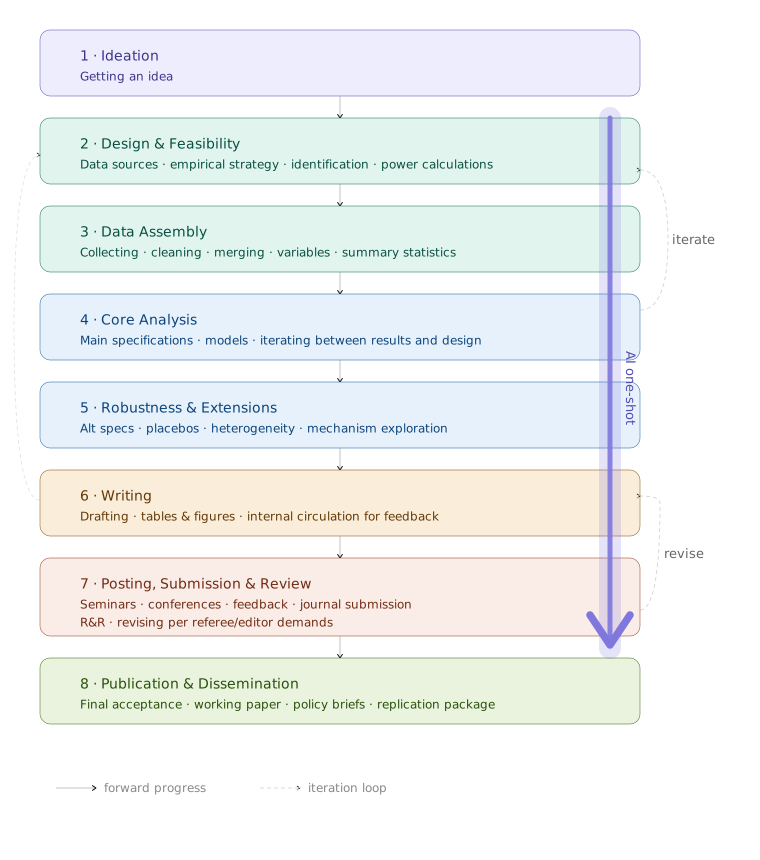
The Fear: AI Collapses the Pipeline
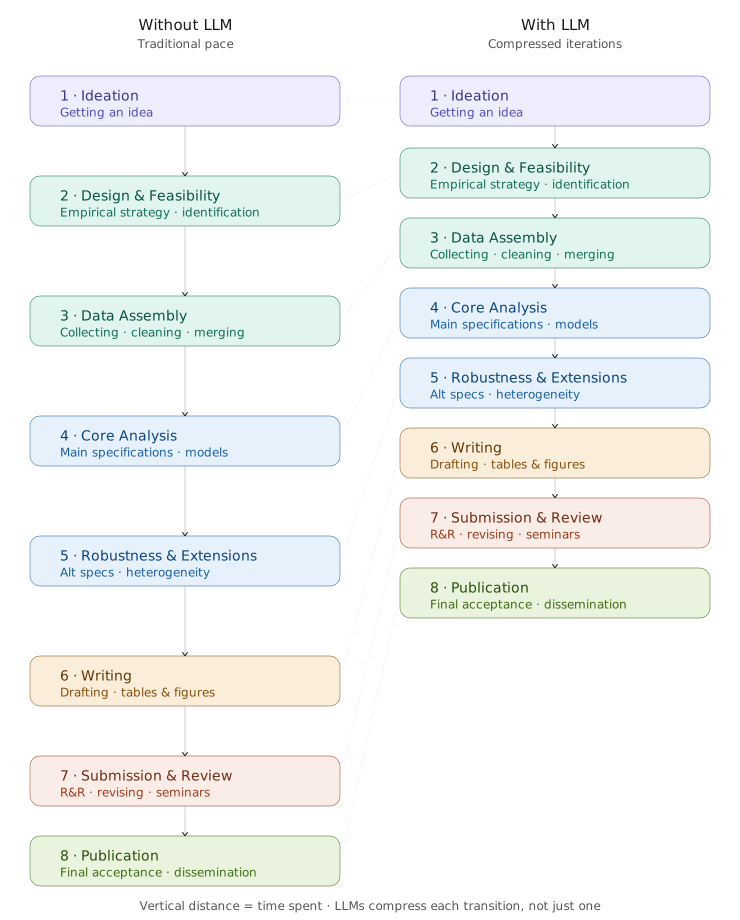
The Reality: AI Compresses the Pipeline
The “Slop” Anxiety
- More papers written with less care
- Less friction → more output (COVID spike)
- AI could make that permanent
- But replication got cheaper too
- Cunningham (CC36): honest public self-correction
The Job Anxiety
What LLMs replicate
- Writing code
- Cleaning data
- Implementing estimators
- Producing first drafts
- Formatting tables
→ Execution skills — depreciate fast
What they don’t
- Which question matters
- Credible identification design
- Spotting when data lies
- Iterating until it works
→ Research judgment — appreciates
Even If You Never Run a Regression
- Summarize 30 papers in minutes
- Regression table → policy brief
- Extract themes from interviews
- Draft R&R responses
- Triage inbox by VIP/topic
What These Tools Are
A Note Before We Start
- You don’t need to become a terminal user (there are app versions of this too)
- Some will use these tools directly
- Others will supervise an RA who does
- Today: understand what’s possible
How LLMs Work
- Trained on vast amounts of text
- Idea: Predict the most likely next word
- No memory between separate calls
- No internet access by default
- Pattern matching, not understanding
- Prompt: Your input that gets encoded
The “Chat”
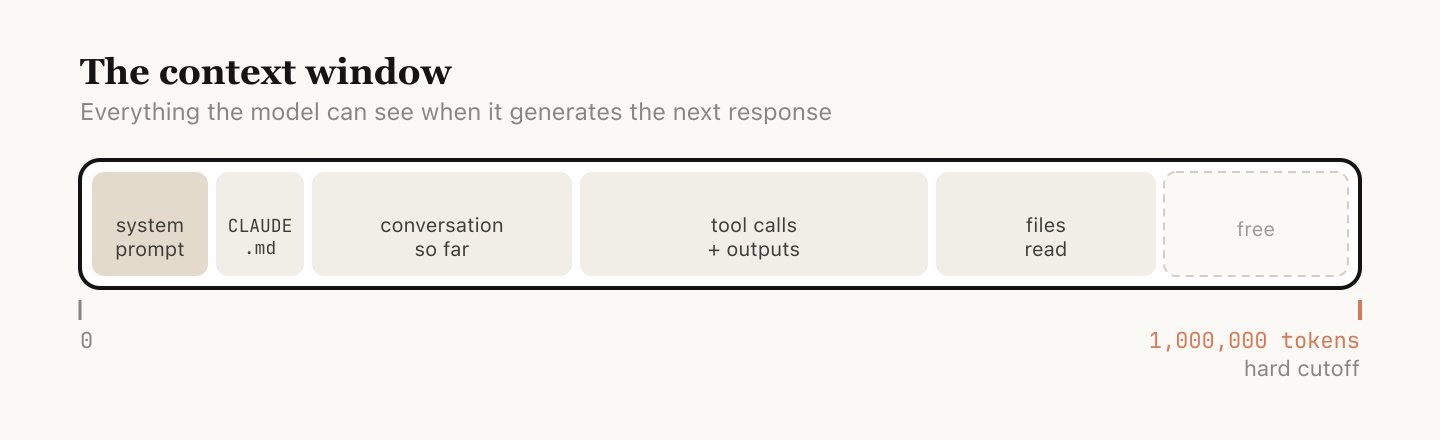
From Chat to Agent
- Same LLM, new scaffolding (“harness”)
- Can read your files
- Can write and run code
- Can iterate on errors
- R, Python, Stata, LaTeX — anything
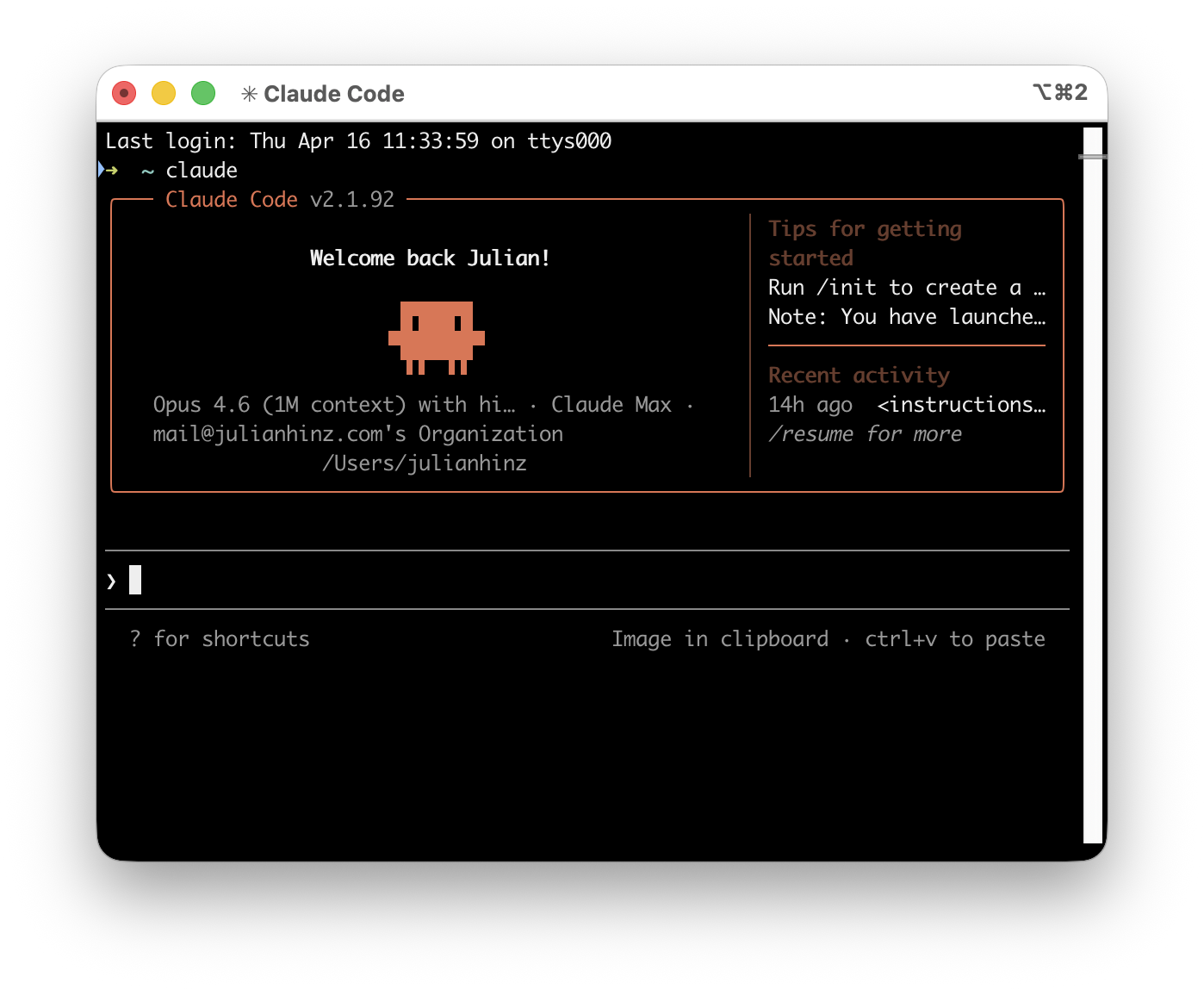
What Is a Terminal?
A text interface to your computer. You already know one: the Stata command window, the R console, a Jupyter cell.
CLAUDE.md — The Briefing Memo
Write it once. Claude reads it every session.
# China–Africa Zero-Tariff Policy Brief

## Goal
Quantify the impact of China eliminating all tariffs on imports
from 53 African countries, using the KITE trade model (GTAP 11).

## Data
- input/baci/ — BACI bilateral trade flows, HS6, cols: t, i, j, k, v, q
- input/initial_conditions/ — GTAP 11 initial conditions (.rds)
- input/metadata/countrygroups.R — AFRICA53, AFRICA_LDC, EU27

## Stack
- R with data.table, magrittr, ggplot2
- Figures: theme_minimal(), Kiel cream #F5F1E7, blue #194ABB
- snake_case for variables, SCREAMING_SNAKE for constants

## Rules
- Always copy initial conditions before modifying (copy-first pattern)
- Save every figure as PNG + PDF pair
- Never edit docs_policy_brief/ — edit output/policy_brief.tex instead
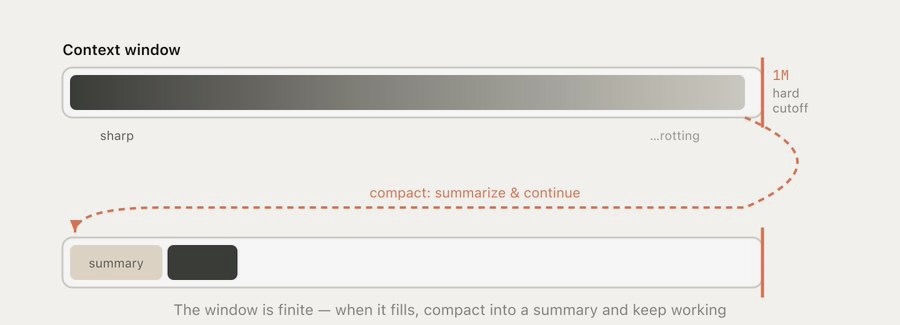
- Commit after every completed stepWhen the Window Fills
What About My Data?
The Dropbox rule
If you wouldn’t put it on Dropbox, don’t let Claude read it.
- Files stay on your machine
- API content not used for training
- But what Claude reads is sent to the API
.claudeignoreto exclude sensitive folders- Use aggregated extracts for confidential data
Live Demo
Where This Sits
| Level | What it is | Example |
|---|---|---|
| 0–1 | Browser chat, copy-paste | ChatGPT, Claude.ai |
| 2 | IDE-integrated agent | Cursor, GitHub Copilot |
| 3 | Terminal agent, full file access | Claude Code · Codex CLI |
| 4 | Agent + external connectors | Gmail, Zotero, databases |
| 5 | Autonomous sub-agents | Long-running, self-directed |
You just saw Level 3. ~$20/mo Pro · ~$100/mo Max
Verify Everything
- LLMs produce plausible but sometimes wrong output
- Check observation counts after merges
- Check coefficient signs and magnitudes
- Check assumptions (SEs, sample restrictions)
- You are the expert. Claude is the RA.
BREAK
15 minutes
Nuvolos login on screen · companion website QR code
Survey Results
Two groups in the room
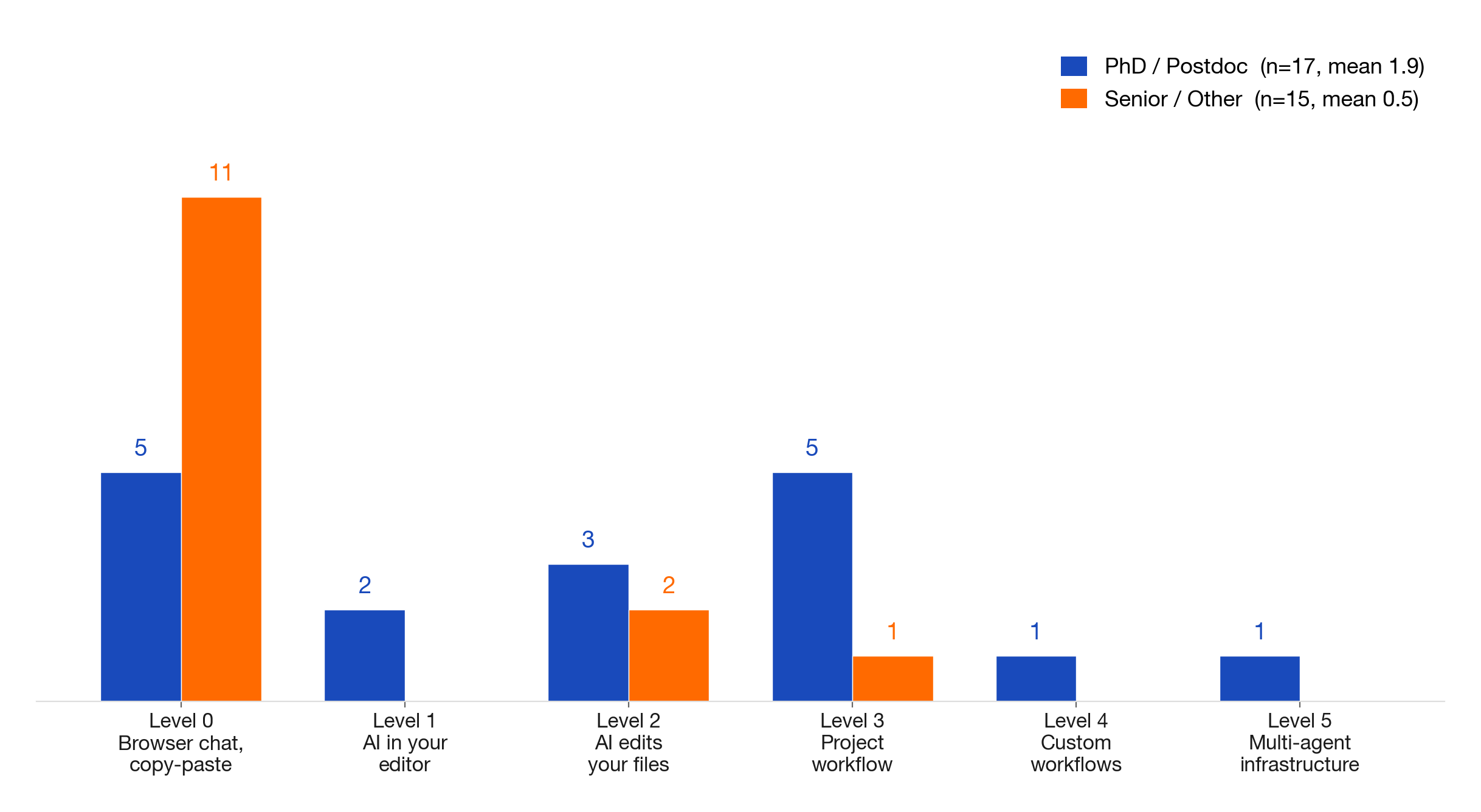
What you want vs what you know
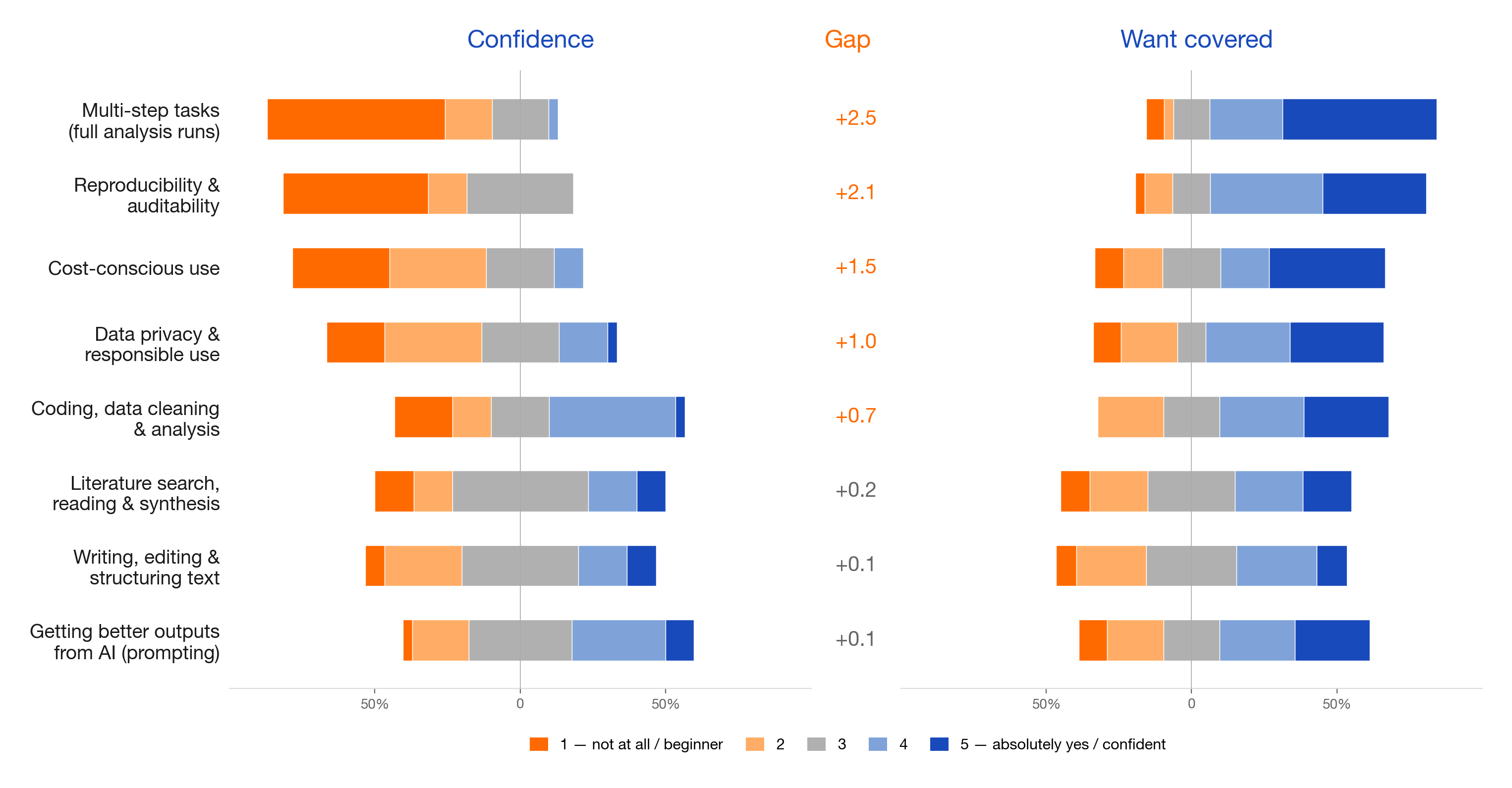
Different starting points
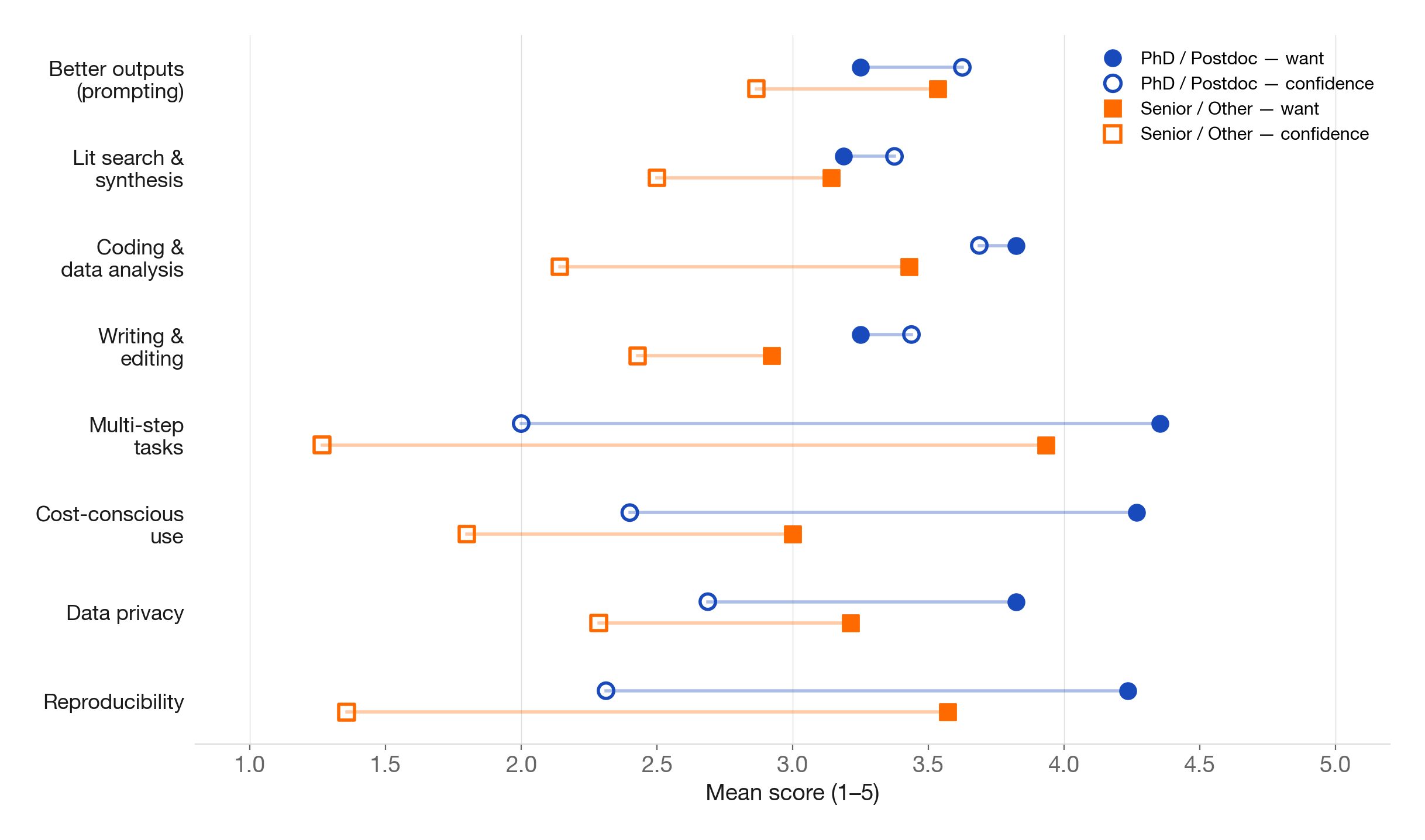
Hands-On
First — Everyone Types the Same Thing
Everyone types the same first prompt. Nobody moves on until it works.
“What files are in this folder? Summarize the data.”
Buddy system: comfortable with the terminal? Pair with someone who isn’t. You type, they steer.
Two Tracks
Beginners
- First time with a terminal?
- Short guided prompts
- Each builds on the last
- Confidence first, sophistication later
Advanced
- Already use Cursor or Copilot?
- Write a CLAUDE.md + plan.md
- Initialize Git, execute, push
- Full workflow in 40 minutes
Advanced Patterns
CLAUDE.md in Depth
Global for you · Project-level for this project · Both read at session start.
For code projects
- Data sources, column names
- Language, packages, versions
- Naming conventions
- Plotting style and colours
- What NOT to do
For writing projects
- Project context and goal
- Voice, tone, ban list
- Key references, terminology
- Constraints and boundaries
- What NOT to do
The Plan-Review-Revise Loop
80% planning, 20% execution.
- Plan — steps, files, checks
- Review — fresh session, skeptical prompt
- Revise — fix what the reviewer found
- Execute — one session per task
Same-session review = self-peer-review. New session = honest referee.
Git Is Not Dropbox
Dropbox
- Syncs files automatically
- Versions by timestamp
paper_final_v2_REAL_final.docx- No history of why
- One editor at a time
Git
- You choose when to take a snapshot
- Every snapshot explains why
- Clear, queryable decision history
- Multiple people, merged cleanly
- Go back to any previous state
You Don’t Need Git Commands
Git has ~150 commands. Just ask in plain English:
“Commit what we just did with a descriptive message.”
“Push this to GitHub.”
“What has changed since yesterday?”
You stay in the what. Claude handles the how.
Multi-Session Workflows
State lives in files, not in the chat.
Session 1    Clean data            → output/cleaned.csv
Session 2    Read cleaned.csv      → run regressions → tables
Session 3    Read tables           → make figures
Session 4    Read figures + tables → draft paper section
CLAUDE.md persists. Results persist. The chat does not need to.
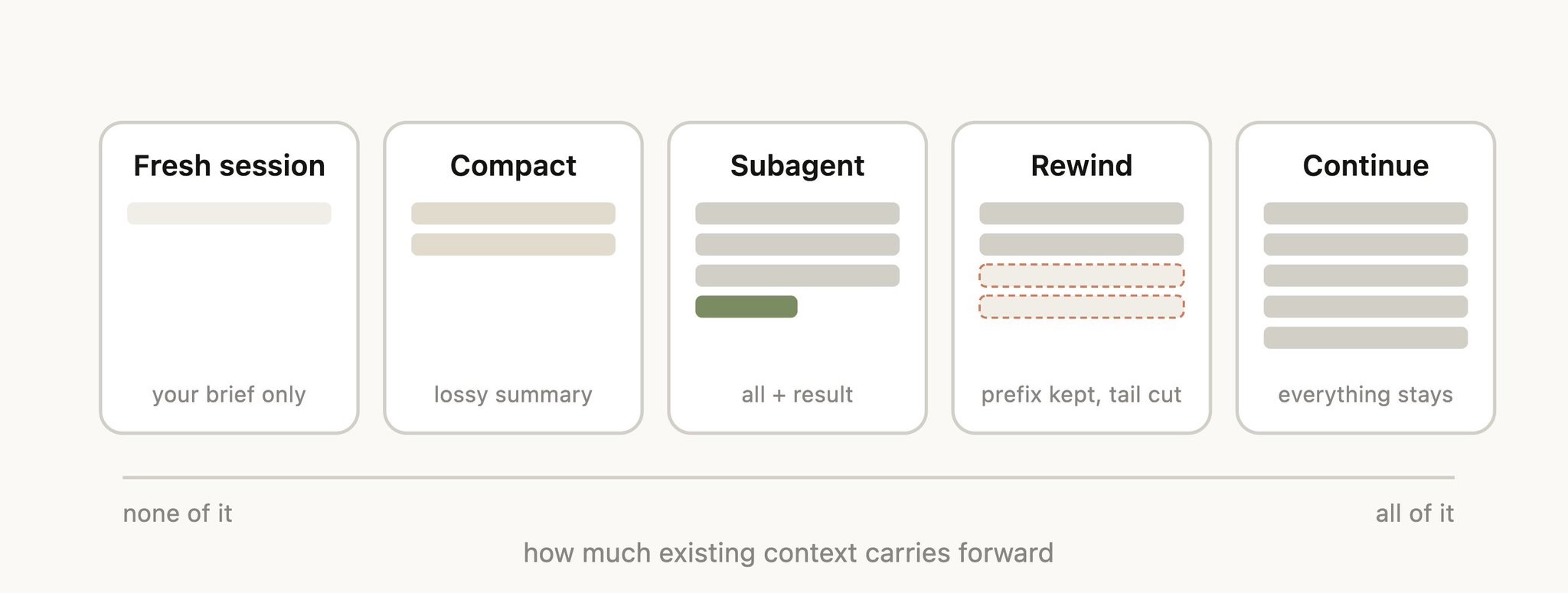
Five Ways to Manage Context
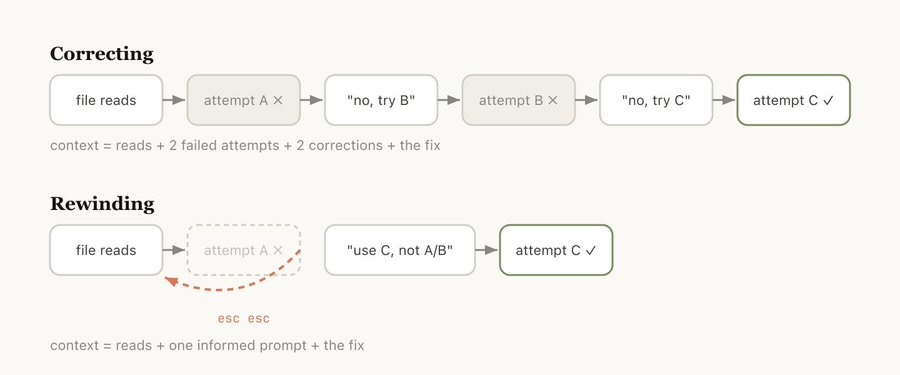
Correcting vs Rewinding
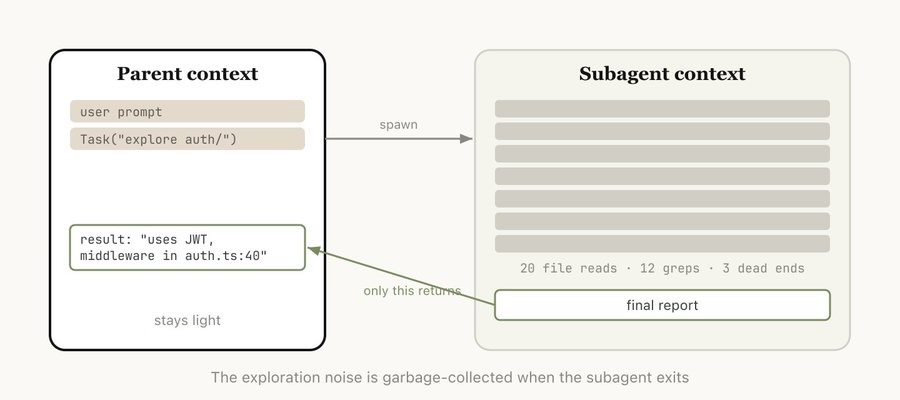
Subagents
Where This Is Going
- Now: Codex CLI (OpenAI’s terminal agent) — good as a second opinion
- Now: MCPs — connectors to Gmail, Zotero, databases
- Emerging: Plan-and-execute splits across models
- Emerging: Autonomous agents running for hours unsupervised
Wrap-Up
Three Things to Remember
AI compresses the pipeline. It doesn’t replace the researcher.
CLAUDE.md is your most important file. Brief the AI like a new RA.
Start small. One prompt, one task, one session.
Your Next Step
- This week: Read Goldsmith-Pinkham’s Getting Started with Claude Code and following posts
- This month: Write a CLAUDE.md for your main project
… and follow-up AI Lunches / Workshops / Bootcamps?
The Companion Website Has Everything
- These slides
- Setup for Nuvolos and local install (Mac + Windows)
- Both hands-on tracks with full prompts and tips
- Deep guides: terminal, CLAUDE.md, Git, privacy, costs, context windows
- Links to further resources
Kiel Institute AI Bootcamp · Hinz & Jacobs